Sumlio: Expense & Budget5.7.1.0
Publisher Description
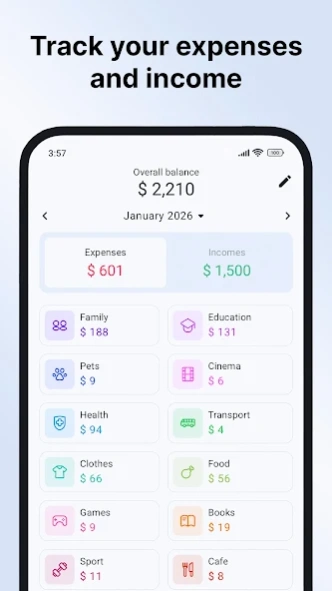


Accounting for expenses, budgets, money management, personal finance tracking
The expense manager "Sumlio: Expense & Budget" helps you track expenses and income in one organized app. Record daily spending, monitor where your money goes, and maintain a clear overview of your financial activity with a structured interface.
Create daily, monthly, or yearly budgets based on your needs. Set spending limits for categories and compare actual expenses with planned amounts. The built-in budget planner allows you to see whether you stay within your limits and adjust your spending accordingly. By using the budget app regularly, you can build a more consistent approach to money management.
This spending tracker supports multiple wallets and accounts, making it easier to manage different sources of income and expense flows in one place. Multi-currency support allows you to track finances across various currencies without switching tools.
Adding transactions is simple and fast. Record expenses, income, and transfers, select categories, define the date and time, and add notes when needed. Pre-defined categories are available, and you can customize them to match your financial structure. The finance tracker adapts to different time periods, so you can review daily, weekly, monthly, or custom reports.
Detailed reports provide a clear view of your personal finance data. Analyze expenses by category, review income trends, and understand how your spending develops over time. Visual summaries help you identify patterns without complex accounting processes.
Sumlio also works as a bill organizer, helping you keep track of recurring payments and regular obligations. Combining income tracking and expense tracking in one money manager gives you a complete overview of your budget.
Track earnings from salary, freelance work, business activities, or investments and see how they integrate into your overall financial picture. By reviewing both income and expenses together, you can make informed budgeting decisions based on actual data.
If you are working toward specific financial goals or reducing unnecessary costs, the budget planner allows you to monitor progress and adjust category limits when needed. Regular tracking helps maintain transparency and discipline in everyday spending.
The app focuses on clarity, speed, and flexibility. Whether you need a simple expense tracker for everyday purchases or a structured budget app for long-term planning, Sumlio supports consistent personal finance management without unnecessary complexity.
If you have any questions or feedback, please contact us at contactmeapprt@gmail.com
About Sumlio: Expense & Budget
The company that develops Sumlio: Expense & Budget is Oleksandr Kinakh. The latest version released by its developer is 5.7.1.0.
To install Sumlio: Expense & Budget on your Android device, just click the green Continue To App button above to start the installation process. The app is listed on our website since 2026-08-22 and was downloaded 25 times. We have already checked if the download link is safe, however for your own protection we recommend that you scan the downloaded app with your antivirus. Your antivirus may detect the Sumlio: Expense & Budget as malware as malware if the download link to com.jojdevx.expense.tracker is broken.
How to install Sumlio: Expense & Budget on your Android device:
- Click on the Continue To App button on our website. This will redirect you to Google Play.
- Once the Sumlio: Expense & Budget is shown in the Google Play listing of your Android device, you can start its download and installation. Tap on the Install button located below the search bar and to the right of the app icon.
- A pop-up window with the permissions required by Sumlio: Expense & Budget will be shown. Click on Accept to continue the process.
- Sumlio: Expense & Budget will be downloaded onto your device, displaying a progress. Once the download completes, the installation will start and you'll get a notification after the installation is finished.
Program Details
System requirements
Download information
Pricing
Version History
version m.5.7.1.0
posted on 2026-08-22
[New feature]
- You can now attach photos to transactions using your camera or saved photos. Add receipts, invoices, or other images to keep important details right where you need them and make transactions easier to identify later.
version m.5.6.2.0
posted on 2026-08-06
[New]
- Operation tags: create, filter and view stats by tag.
[Improvements]
- Choose which fields to export to CSV and PDF.
- Average values show how many days they cover.
- Categories in a single column.
[Fixes]
- Wrong total in the budgets header.
- "All time" and custom periods skipped some operations.
- Formatting of very small amounts.
- Subcategory renaming was not synced.
- Element scaling in landscape orientation.
- Text in input fields started lowercase.
version m.5.5.1.1
posted on 2026-07-23
[New Features]
- Export data as PDF
- Quickly add transactions from the app icon
- Option to hide decimal places
- Set the first day of the week
[Improvements]
- Enhanced privacy settings
- Formatting style with 3 decimal places
- Tapping a date in the transaction list creates a transaction for that date
- Increased performance
version m.5.5.0.0
posted on 2026-07-18
[New Features]
- Export data as PDF
- Quickly add transactions from the app icon
- Option to hide decimal places
- Set the first day of the week
[Improvements]
- Enhanced privacy settings
- Formatting style with 3 decimal places
- Tapping a date in the transaction list creates a transaction for that date
version m.5.3.2.0
posted on 2026-07-05
[Improvements]
- Automatically start synchronization after login if synchronization permission is available.
- Display synchronization status immediately in the profile.
[Fixes]
- Fixed an issue where, if the app remained open in the background and a new date period began, the date was not updated automatically when returning to the app.
version m.5.3.0.0
posted on 2026-06-24
[New Features]
- Privacy settings for the app in the recent apps screen.
- Multi-selection of transactions and actions for them.
[Improvements]
- New widget with total balance, expenses, and income.
- Additional actions for categories.
- Additional actions for subcategories.
[Fixes]
- Reopening the app did not trigger the password screen.
version m.5.1.1.0
posted on 2026-06-08
What's new:
- Privacy mode: tap the eye icon at the top of the app to hide amounts on the screen.
- You can now save the app data file and restore from it. Your data is safer than ever. It can also be used as an alternative to cloud sync.
version m.5.0.4.0
posted on 2026-05-26
Bug fixes and improvements
version m.4.2.7.0
posted on 2026-03-07
Expanded the list of supported currencies in the app.
version m.4.2.6.3
posted on 2026-02-24
Improved stability and bug fixes.
